Weilin Ruan / 经历Experiences
全部经历All experiences

ByteDance 字节跳动

从训练平台维护,
到智能运维系统。
From training infrastructure
to intelligent DevOps.

在 Data-AML 企业服务团队的半年里,我从训练任务的日志、告警和模型同步做起,逐步转向 AI 应用开发,主导了 OnCallAgent。2026 年,我把项目和后续完善整理成 DevOps-MAS:一个能够读文档、看截图、调用工具,并积累排障经验的运维助手。During six months with Data-AML enterprise services, I worked on training logs, alerts and model synchronization before moving into AI applications and leading OnCallAgent. In 2026, I brought the project and later improvements together as DevOps-MAS: an assistant that reads documents, interprets screenshots, uses tools and retains troubleshooting knowledge.

实习Internship2025.03.28 — 09.12
方向FocusML Infrastructure / AI Agents

2026 项目收尾版2026 project wrap-up

训练平台Training platform运维工作流Operations workflow
日志与告警Logs & alerts训练状态Training state模型快照Model snapshots
OnCallAgent
AgentsRAG + ToolsMemory + SFT
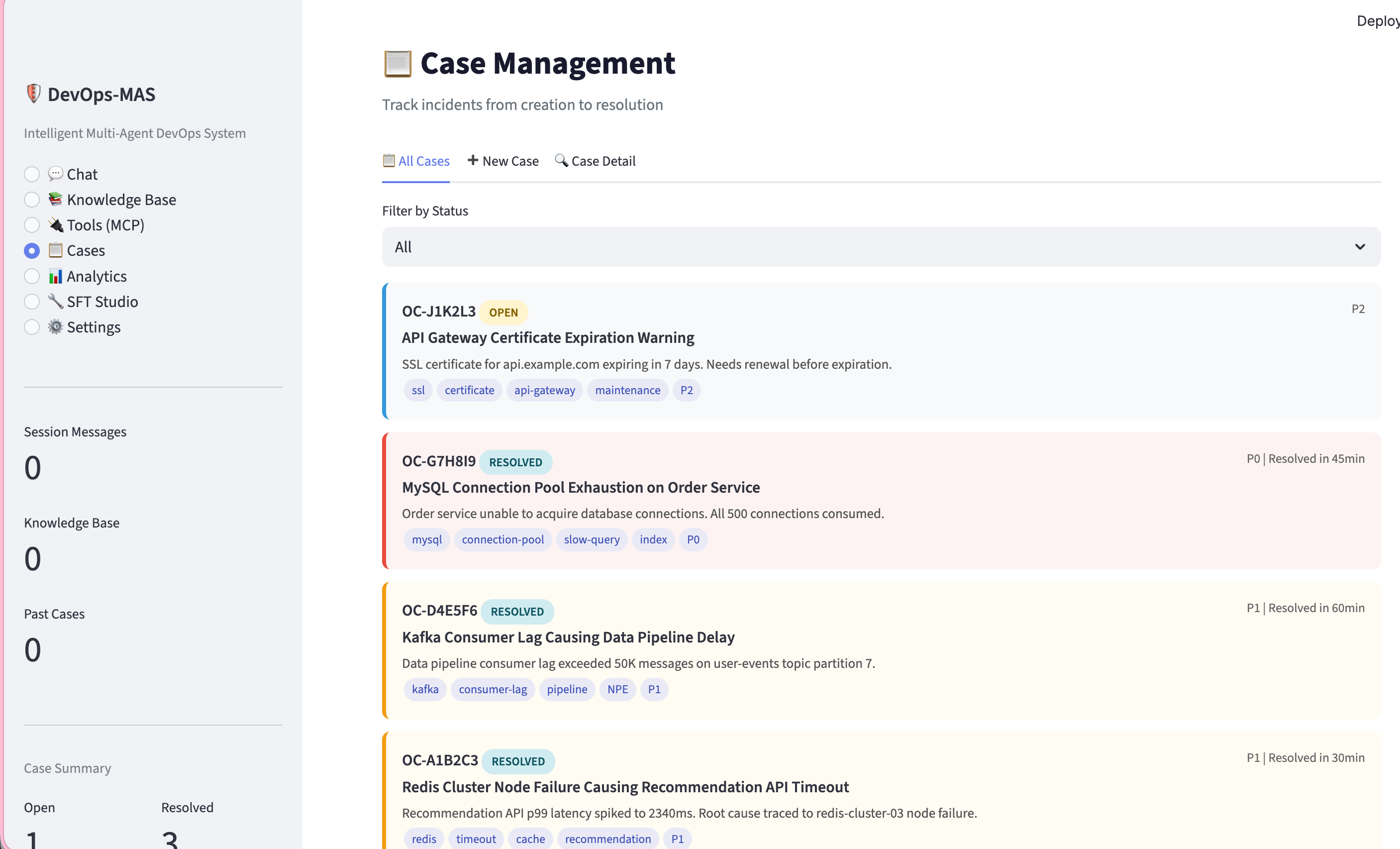
DevOps-MAS case management interface with example incidents
公开版本 · 案例管理界面(演示数据)Public release · Case management (demo data)

这半年,我的工作怎样展开How the work unfolded

日常工作横跨后端开发、测试、运维和 AI 应用。从处理一个具体问题,到把经验整理进一个完整的系统。My work spanned backend development, testing, operations and AI applications, from individual issues to a system that retains the experience.

Platform

训练平台维护Training infrastructure

新增异常监控和日志预警,参与训练同步与快照功能开发,处理兼容问题、测试环境和服务升级。Added monitoring and log alerts, developed synchronization and snapshot changes, and handled compatibility, test environments and service upgrades.

告警 / 状态同步 / 测试上线Alerts / Synchronization / Release
OnCallAgent

智能运维助手A troubleshooting assistant

主导 OnCallAgent,将接收问题、选择处理方式、查文档、调用工具和整理回答连成一套排查流程。Led OnCallAgent, connecting question intake, routing, document retrieval, tool use and response synthesis.

多模态 / 文档检索 / 工具协作Multimodal input / Retrieval / Tools
Delivery

交互、部署与交付Interfaces and delivery

制作界面和 Demo,适配模型与运行环境,整理研发模板及维护文档,并在收尾版本中补齐记忆、案例和训练数据接口。Built interfaces and a demo, adapted models and environments, documented workflows, and completed memory, cases and training-data interfaces.

界面 / 部署 / 文档与数据Interfaces / Deployment / Documentation

从一条告警,追到训练任务的状态From an alert to a training job

刚加入团队时,我先梳理推荐系统从数据、离线训练到在线推理的流程,再进入训练平台的具体需求。I began by mapping recommendation data, offline training and online inference, then worked on specific platform requirements.

让异常告警带上排查线索Give alerts useful context

训练任务报出 Worker lost 后,工程师还需要知道哪个角色、哪个容器出了问题,以及相关日志里发生了什么。我把监控数据和训练日志接入告警流程,新增 lost 角色监控和超过 1 GB 的日志预警,补充日志上下文,并处理超时、读取失败和旧版 Python 的格式兼容。最后完成镜像打包、服务升级与上线。A Worker lost alert still leaves questions about the affected role, container and logs. I connected monitoring data and training logs, added lost-role monitoring and alerts for logs exceeding 1 GB, enriched the context, and handled timeouts, failed reads and older Python formatting. I then packaged the image and upgraded and released the service.

把训练同步的开关传到正确的位置Carry synchronization settings through the system

另一项需求是让用户控制训练过程中的模型同步与快照。我负责把任务参数从提交入口传到参数服务器和模型元数据,并调整同步、快照相关的判断逻辑。联调中验证了参数传递,继续定位状态标记异常,再把修改和测试过程整理交接,供同事推进后续版本。Another requirement let users control model synchronization and snapshots. I carried settings from job submission through the parameter server into model metadata and revised the related logic. Integration checks confirmed parameter propagation; I investigated a remaining state-marker issue and handed over the changes and test procedure for the next version.

一个设置,会经过哪些环节?Where does one setting travel?

切换情境,看看任务、参数服务器和快照怎样配合。Switch scenarios to see how jobs, parameter servers and snapshots fit together.

为什么一个开关需要反复联调?Why did one setting need repeated integration checks?

用户只看到一个设置,系统里却有调度、参数服务器和快照等多个环节。任务切换阶段、服务重载和快照恢复时,都要知道这个设置是否仍然有效。我需要沿着整条路径核对状态,并把出问题的边界留在测试和维护记录中。The user sees one setting, but it passes through scheduling, parameter servers and snapshots. Stage changes, service reloads and restoration all need to preserve its meaning. I traced that path and documented the boundaries where testing revealed problems.

DevOps-MAS:把排障过程组织起来DevOps-MAS: organizing the diagnostic workflow

工程师排查问题时,经常要来回翻日志、看监控、搜文档,再问有经验的同事。我想把这些动作组织起来,让一个问题带着上下文走完整个流程。Troubleshooting involves moving between logs, dashboards, documentation and colleagues. I wanted those steps to work together while retaining the original context.

Web / CLIFastAPI飞书适配Feishu adapter
路由Routing视觉Vision日志Logs指标Metrics知识Knowledge检索Retrieval搜索Search综合Synthesis

点选模块,了解我怎样设计这一步。Select a module to explore its design.

一个问题,什么时候需要多个 Agent?When does a question need several Agents?

日志报错、监控截图和文档问答需要不同的处理方式。我用关键词、领域线索、图像和文档引用选择处理角色;问题较复杂或已有结果不够明确时,再补充其他角色,最后把它们的发现汇成一个回答。Log errors, screenshots and documentation questions need different approaches. Keywords, domain signals, images and references guide role selection. When the question or initial result calls for it, other specialists contribute before their findings are synthesized.

为什么同时保留搜索和 @文档?Why offer search and @document references?

有时用户只知道问题,有时已经知道答案可能在哪份文档里。我给这两种情况保留了入口:前者按文件名、关键词、标题和段落寻找相关内容;后者直接引用指定文档。Sometimes a user only knows the problem; sometimes they know the relevant document. Search matches filenames, keywords, headings and sections, while an @document reference goes straight to a known source.

怎样把一次回答变成长期有用的经验?How can one answer become reusable knowledge?

对话记忆保留当前问题的来龙去脉,案例库记录症状、根因和处理方式。收尾版本进一步把交互、已解决案例和人工样本整理成训练数据,支持筛选、Alpaca / ShareGPT 格式导出,以及 LoRA / QLoRA 训练配置生成。Conversation memory preserves the current investigation; cases retain symptoms, causes and resolutions. The final version turns interactions, resolved cases and curated examples into training data, with filtering, Alpaca / ShareGPT export and LoRA / QLoRA configuration generation.

跟随一次故障排查Follow a diagnostic walkthrough

选一个问题,逐步看看助手如何理解输入、寻找线索和组织回答。Choose a question and follow how the assistant interprets it, gathers evidence and prepares a response.

交互示例Interactive example
工程师的问题Engineer’s question

    写完功能之后,还有测试、协作和交付Beyond the feature: testing and collaboration

    我也花了不少时间准备测试环境、整理研发模板,把开发过程和交付方式记录下来。Much of the work involved preparing an environment, reviewing a change and making the result understandable to others.

    准备能够验证改动的环境Prepare an environment for validation

    我整理训练调度服务的测试步骤:发布测试版本、拉取镜像、准备独立容器与依赖,再替换待测代码检查行为。版本、挂载和环境配置都要对齐,出现拉取或运行问题时继续排查。I documented how to test the training scheduler: publish a test version, fetch its image, prepare a separate container and dependencies, and replace the code under test. Versions, mounts and configuration had to match, with troubleshooting for image and runtime failures.

    把 AI 工具用到研发协作中Use AI tools in development

    我使用 AIME 制作 OnCallAgent Demo,并整理代码审查、仓库解读和提示词生成模板。模板把需求拆成输入、分析步骤和输出格式,让结果包含修改目的、风险、改进建议,以及帮助理解结构的图示。I used AIME to build an OnCallAgent demo and prepared templates for code review, repository analysis and prompt writing. They specify inputs, analysis steps and output formats, covering change intent, risks, improvements and explanatory diagrams.

    01准备测试版本Prepare a test version
    02搭建独立环境Set up the environment
    03检查行为与边界Check behavior and edge cases
    04记录并交接Document and hand over

    从个人开发环境,到可以交付的应用From my development environment to a usable app

    迁移项目时,我开始认真处理一个问题:换一台机器、换一种模型,别人能不能继续用起来?Moving the project raised a practical question: could someone else use it on a different machine or with a different model?

    围绕显存和环境做取舍Adapt to memory constraints

    最初的稳定版本在自己的服务器上开发。迁到内部开发机后,24 GB 显存成为约束,我借助 AIME 反复迭代、精简代码,并把本地 GUI 作为实习阶段的可用交付入口。I developed the initial stable version on my own server. Moving to an internal machine brought a 24 GB GPU-memory constraint. I iterated with AIME, simplified the code and delivered the local GUI at the end of the internship.

    把常用操作放进同一个界面Bring everyday tasks together

    2026 年收尾版本提供对话、知识库、工具、案例、分析、训练数据和设置七个页面。工程师可以提问、管理文档、跟踪问题,也可以回看案例的根因和处理方式。The 2026 version has seven pages for chat, knowledge, tools, cases, analytics, training data and settings. Engineers can ask questions, manage documents, track issues and revisit causes and resolutions.

    适配不同的使用方式Support different ways of using the system

    除 Web 界面外,我整理了命令行、API 和飞书消息适配代码,以及云端模型 API 与本地模型的调用方式。界面和模型可以替换,核心排查流程沿用同一套设计。Alongside the web interface, I prepared CLI, API and Feishu messaging adapters and support for hosted and local models, retaining the same diagnostic workflow across interfaces.

    用公开版本完成收尾Complete the public release

    我把案例管理、三层记忆和训练数据整理串起来,补齐配置样例、Docker 部署及使用文档,最终以脱敏后的 DevOps-MAS 公开版本为这段实习项目收尾。I connected case management, three memory layers and training-data preparation, then added configuration examples, Docker deployment and documentation for the sanitized DevOps-MAS release.

    从具体任务,到项目收尾From individual tasks to the final release

    平台任务和 Agent 开发交错推进,后续整理让整个项目有了完整的收尾。Platform work and Agent development progressed alongside each other; later consolidation completed the project.

    1. 进入 Data-AML 企业服务团队Join Data-AML enterprise services

      熟悉推荐系统的数据、训练和推理流程,搭建开发环境,阅读训练平台与运维资料。Learn the recommendation stack, set up the development environment and study platform operations.

    2. 完成日志预警与服务升级Ship log alerts and a service upgrade

      新增 lost 角色监控和日志体积预警,修复兼容问题,打包上线;同时开始 OnCallAgent 开发。Add lost-role and log-size alerts, fix compatibility issues and release the service; begin OnCallAgent development.

    3. 推进训练同步开发与联调Develop and test synchronization changes

      打通任务参数到参数服务器的传递,调整模型和快照逻辑,定位联调问题并整理后续交接。Connect job settings to the parameter server, revise model and snapshot logic, investigate integration issues and prepare the handover.

    4. 迭代 OnCallAgent 与演示界面Iterate on OnCallAgent and its demo

      完善 Web、API 和消息适配,借助 AIME 制作 Demo,处理环境迁移与显存约束,整理交付文档。9 月 12 日结束实习。Refine Web, API and messaging adapters, build a demo with AIME, adapt to memory constraints and document the handover. The internship ends on September 12.

    5. 以 DevOps-MAS 完成收尾Complete DevOps-MAS

      整合 Agent、记忆、案例和训练数据模块,补齐独立部署与展示界面,形成脱敏公开版本。Consolidate Agents, memory, cases and training data, complete standalone deployment and interfaces, and release the sanitized project.

    具体做了什么The work in detail

    从日常维护到系统开发,再到测试和文档,把每一部分展开看。Explore the work across platform maintenance, system development, testing and documentation.

    一边做项目,一边补上背后的知识Learning alongside the work

    阅读和调研围绕手上的问题展开:平台为什么这样组织,Agent 怎样评估,长序列模型为什么会慢。My reading followed practical questions: how the platform fits together, how to evaluate Agents and why long-sequence models become expensive.

    推荐系统与训练平台Recommendation and training systems

    从客户数据、特征与索引,到离线训练、在线服务,再到参数服务器、任务编排和资源分配,梳理整条流程。Map customer data, features and indexes through offline training and online serving, including parameter servers, orchestration and resource allocation.

    判断一个问题发生在哪一层。Understand which layer an issue belongs to.

    Agent 的能力与评测Agent capabilities and evaluation

    对照 GAIA、SWE-bench Verified 和 WebVoyager,了解多步推理、工具使用、代码修复与网页任务怎样被评估,并研究 VLM、RAG 和工具调用的组合。Study GAIA, SWE-bench Verified and WebVoyager to understand evaluation of reasoning, tools, code repair and web tasks, alongside VLM, retrieval and tool integration.

    把回答质量和任务完成联系起来。Connect answer quality to task completion.

    长序列推荐与计算效率Long-sequence recommendation

    围绕 Transformer、Perceiver、稀疏注意力、RoPE 和 KV Cache 做笔记,比较序列压缩、缓存复用和注意力计算中的信息保留与资源开销。Study Transformers, Perceiver, sparse attention, RoPE and KV caching, comparing information retention and resource costs in compression, caching and attention.

    把模型结构与显存、带宽和计算量联系起来。Connect model architecture to memory, bandwidth and compute.

    模型部署与训练数据Deployment and training data

    整理模型 API、本地推理、低成本微调和 RAG 失败模式的学习资料,把其中的思路用于模型适配、文档检索和训练数据准备。Study hosted APIs, local inference, efficient fine-tuning and RAG failure modes, applying those ideas to model adapters, retrieval and data preparation.

    让学习回到具体的设计选择。Use the reading to inform design choices.

    多模态 Agent 与工具协议Multimodal Agents and tools

    调研多模态工具使用、GUI 理解,以及模型怎样连接数据和工具。围绕 MAT、CogAgent 和 MCP 整理设计思路。Survey multimodal tool use, GUI understanding and model access to data and tools, with notes on MAT, CogAgent and MCP.

    为截图分析和工具接入寻找参考。Inform screenshot analysis and tool integration.

    推荐排序与组合Recommendation ranking and selection

    阅读排列推荐和 Exact-K 推荐的资料,关注候选列表的整体效果,以及列表奖励、组合关系和示范学习。Read about permutation-based and Exact-K recommendation, focusing on list-level outcomes, rewards, item relationships and learning from demonstrations.

    从单条预测延伸到整组推荐的选择。Consider the recommendation list as a whole.
    这段实习改变了我怎样做项目What I took away

    最开始吸引我的是模型和 Agent;真正做下来,我对一个应用怎样被使用、维护和接手有了更具体的认识。Models and Agents drew me to the work. Building the application taught me how software gets used, maintained and handed over.

    先理解系统,再修改其中一部分Understand the system before changing it

    一条告警背后连着任务角色、容器和日志;一个同步开关背后连着调度、参数服务器和快照。这些任务让我养成沿着完整流程查问题的习惯,也影响了后来 Agent 的上下文和流程设计。An alert connects roles, containers and logs; a synchronization setting connects scheduling, parameter servers and snapshots. Following these paths became a habit that later shaped the Agent workflow.

    测试和交接也是开发的一部分Testing and handover are part of development

    训练同步的联调让我意识到,参数传过去只是其中一步,还要看后面的行为是否一致。我开始更重视测试环境、边界情况和维护文档,让接手的人能够沿着已有结果继续推进。Synchronization testing showed me that passing a parameter is only one step; downstream behavior must agree with it. I came to value test environments, edge cases and maintenance notes that let the next person continue the work.

    资源限制会改变产品的形态Resource constraints shape the product

    把 Agent 从自己的服务器迁到开发机时,显存和部署条件让我重新选择保留哪些能力、怎样交互。后续收尾时,我也把可替换的模型接口、独立部署和清晰的使用入口放在更重要的位置。Moving the Agent from my server to a development machine forced decisions about capabilities and interaction. That experience made replaceable model backends, standalone deployment and clear interfaces priorities for the final release.

    把这段经历,留在一个可以打开的项目里。A project that carries the experience forward.

    DevOps-MAS 保存了我从平台维护走向 AI 应用开发的过程,也为这段实习项目完成了 2026 年的收尾。DevOps-MAS carries forward what I learned moving from platform maintenance into AI applications, completing the project in 2026.

    DevOps-MAS on GitHub返回全部经历Back to experiences
    Enlarged public project screenshot

    DevOps-MAS 公开项目演示DevOps-MAS public project demo